Updated

AI agents
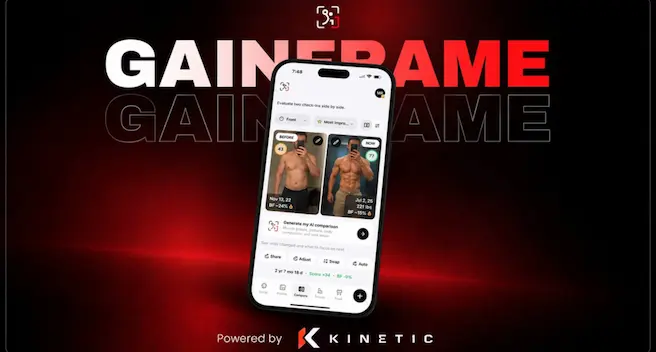
Clip for GainFrame
Board: Content Rewards

Kinetic UGC campaign

Platforms TikTok, Instagram

The Kinetic UGC campaign pays $1 per 1,000 views on TikTok and Instagram, with $947 of a $1,000 budget left at 23:43 UTC on 5 Oct 2026.

CPM
$1.00 per 1K views

Pay per clip

On TikTok
  • 10KVIEWS$9.0010K views pays $9
  • 50KVIEWS$45.0050K views pays $45
  • 100KVIEWS$90.00100K views pays $90

WHY THIS SCORE

Beats 8% of UGC campaigns

≈$9 per clip at 10K views

  • PayLow, weak$1.00 per 1K
  • BudgetHealthy, good$947 left
  • Payout rulesOK, fairNiche locked
  • ApprovalNo data yet, not measured
  • ViewsLow, weak710 views a post
How we rank

Budget runway

SPENT A DAY
$2
BUDGET LEFT
95% of the budget left

The brief

Brief Quality A. Clear briefNo red flags

TO JOIN

  • Open to join
  • Unverified organizer
Read the full brief

THRESHOLDS AND CAPSBoard

MIN PAYOUT
$1before a payout
PAID IN
10days
BOARD FEE
10%of each payout

WHAT TO MAKE

  • Captions on screenBrief
  • The brand's footage and your ownBrief
  • Niche: Fitness / Physique / Gym, a broad nicheBrief
  • NichesBoard
    • App
    • Technology
  • Every post uses this sound: trending gym / training soundsBrief
  • A full-screen logo card or end cardBrief
  • Standard effort, a clean editBrief
  • Match the style of the reference editBrief
  • Follow the example editBrief

DO17

  • Use real gym / progress-photo style shots (your own, Pinterest-aesthetic, or AI-generated)Brief
  • Bio must include the GainFrame App Store search lineBrief
  • Use trending gym / training soundsBrief
  • Easiest: use sounds from the reference accountsBrief
  • Include on every post: #gainframe #gym #fitnessBrief
  • Every caption must tag GainFrame: @gainframeapp on TikTok, @gainframe.app on InstagramBrief
Show all 17
  • Use TikTok / IG's native text tool onlyBrief
  • Match reference hook style, tip pacing, slide count, toneBrief
  • Every slideshow includes a GainFrame app screenshot slideBrief
  • Use the CTA image from the Drive matching your angleBrief
  • Posts should stay up for at least 30 daysBrief
  • Reply naturally to 'What app is this?' commentsBrief
  • Delete comments calling the video an ad, account fake, or app paidBrief
  • Stay on niche at all times (gym, physique, training)Brief
  • Username: first name plus a training wordBrief
  • No reposted contentBoard
  • Caption: "#gainframe"Board

DON'T6

  • Do NOT burn text into images or use CapCut / external overlaysBrief
  • Not allowed: random screenshots, stock photosBrief
  • No other promotions on the same account at one timeBrief
  • Do not post reposted contentBoard
  • No outside footageBrief
  • No reposts of other clipsBoard

CAPTIONBrief

  • Tag the brand, per platform
    • TikTok@gainframeapp
    • Instagram@gainframe.app
  • Add the hashtags
    • #gainframe
    • #gym
    • #fitness
  • Put the brand's link in your bioBio link
  • Keep captions simple
  • End with a call to action

AUDIENCEBrief

  • Viewers in
    • US
    • UK
    • CA
    • AU
  • Tier, 1 audience
  • Views count from
    • US
    • UK
    • CA
    • AU

YOUR PAGEBrief

  • Any page size can join
  • A dedicated page is required
  • Warm up first: A couple days of warm-up (optional): watch, like, follow, comment, engage naturally
  • Allowed niches
    • Fitness
  • No pages with
    • Random screenshots
    • Stock photos

POSTING RULESBrief

  • Delete comments calling the video an ad/promo, the account fake/bot, or saying the app costs money
  • One account per campaign, no other promotions on it at the same time
  • Keep posts up 30 days
  • Get approval before you post

CREATOR PROFILEBrief

  • Creators in
    • Fitness tips & advice
  • Style: Slideshow theme pages with real, Pinterest, or AI gym images

OTHER REQUIREMENTSBrief

  • Bio must include: Search 'GainFrame' on the App Store
  • Custom concepts and CTAs need 10,000+ views to be approved
  • Pinterest images: add 'pics my own and pinterest (dm creds)' to bio
  • Username: first name plus a training word
  • Reply to 'What app is this?' comments naming GainFrame, keep it short

MATERIALS

What to make

POST ON
  • TikTok
  • Instagram

FROM

No footage, make your own content

BoardThe campaign asks for original content (UGC)

THE BRIEF ASKS

  • Use real gym / progress-photo style shots (your own, Pinterest-aesthetic, or AI-generated)
  • Bio must include the GainFrame App Store search line
  • Use trending gym / training sounds
  • Easiest: use sounds from the reference accounts
  • Include on every post: #gainframe #gym #fitness
  • Every caption must tag GainFrame: @gainframeapp on TikTok, @gainframe.app on Instagram
  • Use TikTok / IG's native text tool only
  • Match reference hook style, tip pacing, slide count, tone
  • Every slideshow includes a GainFrame app screenshot slide
  • Use the CTA image from the Drive matching your angle

MUST INCLUDE

  • Add #gainframe“Include on every post: #gainframe #gym #fitness”
  • Add #gym“Include on every post: #gainframe #gym #fitness”
  • Add #fitness“Include on every post: #gainframe #gym #fitness”
  • Tag @gainframeapp“Every caption must tag GainFrame: @gainframeapp on TikTok, @gainframe.app on Instagram.”
  • Tag @gainframe.app“Every caption must tag GainFrame: @gainframeapp on TikTok, @gainframe.app on Instagram.”
  • Keep the brand logo on screen“Every slideshow includes a GainFrame app screenshot, placement is flexible, earlier can convert better since a lot of viewers drop off before the last slide.”
  • End with the call to action“Custom concepts and CTAs are only approved if they show strong performance (10,000+ views)”
  • Put the campaign link in your bio“App Store link in bio: [link] (TikTok doesn't”
  • Use the sound the brief names“Use trending gym / training sounds”
  • Add captions“Keep captions simple.”

AVOID

  • No outside footage“Not allowed: random screenshots, stock photos”
  • No reposts of other clips“No reposted content”

HOW TO GET THE FOOTAGE

  • No footage to get, film your own contentBoardThe campaign asks for original content (UGC)

Ask your AI agent

Briefs are long and full of rules. Connect ClippingAlpha to your agent and it reads this one for you: what to make, what to avoid and where to join.

Common questions

How much does the Kinetic UGC campaign pay?

It pays $1 per 1,000 views on TikTok and Instagram. One clip pays at most $200.

How much budget is left in the Kinetic UGC campaign?

$947 of a $1,000 budget is left at 23:43 UTC on 5 Oct 2026.

Which platforms count for the Kinetic UGC campaign?

Views on 2 platforms count: TikTok and Instagram.

What does it take to get paid?

A clip is paid once it has earned at least $1.

Where can I join the Kinetic UGC campaign?

It is listed on 1 board: Content Rewards.

Similar campaigns